Celebrate with Style: Unlocking the Kids Usa Font
When a project calls for a burst of patriotic energy, the typography you choose does more than just spell out words—it sets the entire mood. Kids Usa is a full-color display font that captures the spirit of celebration with a distinct, whimsical flair. It’s not just another typeface; it’s a visual statement built around a classic red, white, and blue palette. For designers, marketers, and creators looking to inject a sense of fun and festivity into their work, understanding how to use this unique creative font is key to making your projects pop.
The Visual Personality of Kids Usa
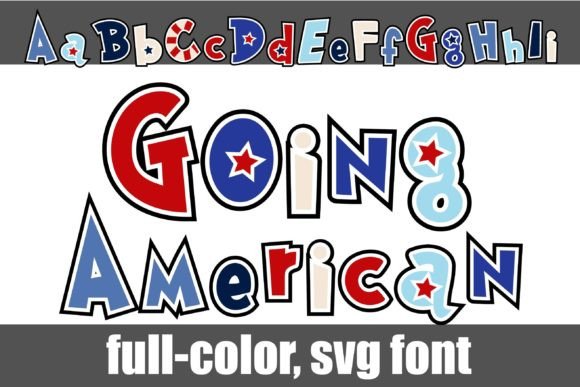
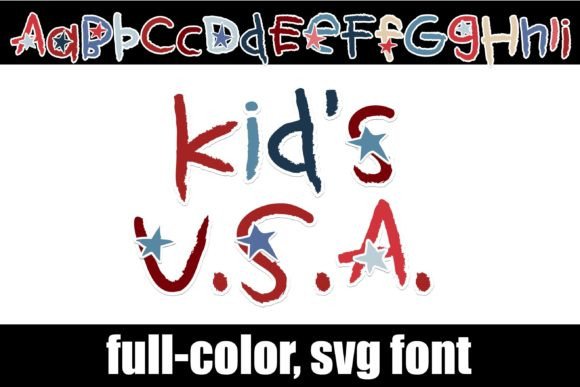
At its core, Kids Usa is a playful, cartoon-inspired display font. The letterforms are rounded, bouncy, and full of character, avoiding the rigid geometry of a standard sans serif font. This gives it an approachable, hand-crafted feel that’s perfect for projects aiming for a friendly and informal tone. The defining feature, of course, is its color. As an OpenType full-color (SVG) font, Kids Usa is designed with embedded color information. Each letter is rendered in a vibrant mix of red, white, and blue, creating an instant patriotic theme without any extra design work on your part.
It’s important to understand what this means for your workflow. This isn't a standard monochrome typeface where you apply color to the entire block of text. The color is intrinsic to the font file itself. The included alt version, accessible through your system’s character map, expands your options with additional color combinations for the letters, offering more creative flexibility. This makes Kids Usa a standout premium font for specific applications where its style is a perfect match.
Where This Festive Font Truly Shines
The bold, graphic nature of Kids Usa makes it unsuitable for body copy or lengthy paragraphs. Its strength lies in headlines, logos, and short, impactful text. Think of it as a specialized tool in your design assets kit. Here’s where it can add significant value:
- Branding and Logo Design: For brands with a patriotic theme, a family-friendly focus, or a connection to American holidays, Kids Usa can be a fantastic choice for a logo or wordmark. It immediately communicates a specific vibe and helps build a memorable brand identity.
- Marketing and Social Media: Use it for Fourth of July sale banners, Memorial Day social media graphics, or election-themed campaign materials. Its eye-catching color and style make it perfect for grabbing attention in a crowded feed, boosting audience engagement for short-form content.
- Publishing and Editorial Design: Imagine this font on the cover of a children’s activity book, a flyer for a community picnic, or a chapter title in a fun, patriotic-themed publication. It brings a level of personality that a standard serif font or sans serif font cannot.
- Packaging and Product Design: If you’re designing packaging for a seasonal product, party supplies, or a snack with an American theme, Kids Usa can make your product stand out on the shelf. It’s a key part of creating a cohesive and appealing visual identity.
- Personal and Craft Projects: For hobbyists and crafters, this font is a dream. Use it with cutting machines like Silhouette or Cricut to create custom t-shirts, tote bags, party decorations, and scrapbook elements. The fact that it’s a commercial font means you can also use it for products you sell.
Practical Guidance for Using a Color Font
Adopting a font like Kids Usa requires a slightly different approach than working with standard typography. Here’s how to integrate it effectively into your projects.
Compatibility is Key
First, ensure your software supports full-color SVG fonts. While the technology is becoming more common, it’s not universal. Programs like Adobe Illustrator, Photoshop, InDesign, Silhouette Studio, QuarkXPress, and Inkscape are known to support them. A common point of confusion is the preview window; often, a color font will appear black in font selection menus. You’ll only see the color once you type it out on the canvas in a compatible program. If it shows as black, your software may not support this modern typography feature, and it will default to a standard black outline.
Evaluating Project Fit and Readability
Before you commit, ask yourself: does this font’s personality align with my project’s goals? Its whimsical style is perfect for a kids' party invitation but would be out of place on a formal business report. Readability is another crucial factor. Because of its decorative nature, use Kids Usa sparingly—typically for headlines of ten words or less. For supporting text, pair it with a clean, simple font pairing like a neutral sans serif to create a clear visual hierarchy and ensure your message is easy to read.
Installation and Licensing
Installing Kids Usa is straightforward. You install the .otf file just like any other font, using FontBook on a Mac or the Control Panel/Settings on Windows. Once installed, it will appear in your font lists in compatible applications. Finally, always review the licensing. As a commercial font, it comes with a license that outlines how you can use it. Typically, this covers a wide range of uses, from digital ads to physical products, but it’s your responsibility to ensure your intended use is covered. This due diligence is a mark of a professional and protects both you and the font’s creator.
In the end, Kids Usa is more than just a collection of letters. It’s a powerful tool for adding a specific, celebratory tone to your work. When used thoughtfully and in the right context, it can elevate your designs, strengthen your brand identity, and connect with your audience in a visually memorable way.