Just Toolin' Around: A Playful Font with Real-World Grit
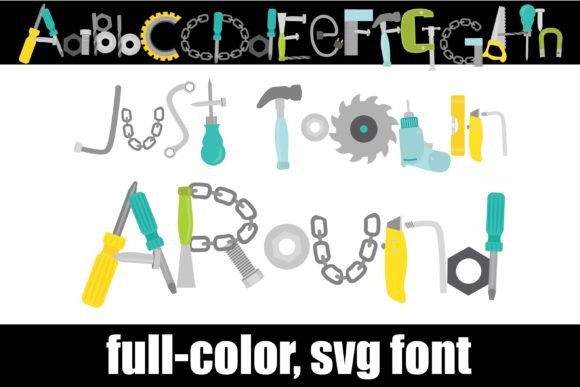
Sometimes a design project needs more than just clean lines and neutral tones. It needs personality, a bit of texture, and a clear point of view. That’s where a premium font like Just Toolin' Around comes in. This isn't your typical sans serif font or elegant script font. It’s a creative font with a distinct character, where many of the letters are cleverly constructed from stylized tools—think wrenches, hammers, and pliers forming the very anatomy of the alphabet.
As a display font, its primary job is to grab attention. The visual style is playful, industrious, and unmistakably hands-on. It carries a personality that’s both approachable and robust, making it ideal for projects that want to convey craftsmanship, DIY spirit, or a down-to-earth, maker aesthetic. It’s the kind of typeface that immediately tells a story, perfect for logo design for a local hardware store, a handyman service, or a creative workshop.
Where This Creative Font Truly Shines
Understanding a font's strengths is key to using it effectively. Just Toolin' Around isn't meant for body text in a novel; its charm is in its detail. It excels as a headline or accent font where its unique character can be fully appreciated. Consider it for:
- Branding & Identity: For businesses in construction, woodworking, repair services, or maker spaces, this font can become a cornerstone of a memorable brand identity. It adds instant personality to logos, business cards, and signage.
- Marketing & Social Media: Use it to create eye-catching social media graphics, promotional flyers for a DIY workshop, or headers for a blog about home improvement. It injects energy and a clear thematic message.
- Packaging & Product Design: Imagine this font on the label of a artisanal hot sauce, a craft beer, or a line of handmade soaps. It adds a layer of authenticity and rugged charm that aligns with artisanal quality.
- Editorial & Publishing: In editorial design, it can work beautifully for magazine section headers, chapter titles in a how-to book, or the cover of a publication focused on trades and hobbies.
- Digital & Web Design: Used sparingly, it can make a website header or a call-to-action button stand out, especially for sites catering to a creative or practical audience.
- Personal Projects & Crafting: For hobbyists creating custom t-shirts, decals, or scrapbook pages, it offers a fun and thematic way to personalize projects.
The font’s influence extends beyond mere decoration. It directly impacts visual hierarchy by naturally drawing the eye. When used as a headline, it establishes the tone before a single word of body copy is read. This can strengthen brand perception, positioning a business as creative, grounded, and skilled. Consistent use across materials builds recognition, making your brand more memorable.
Practical Guidance for Using a Specialty Font
Adopting a specialty font like Just Toolin' Around requires a thoughtful approach. Here’s how to evaluate if it’s the right design asset for your project.
Test for Project Fit and Readability
First, define your project's core message. Does "hands-on," "craftsmanship," or "playful utility" align with your goals? If you're designing for a law firm, probably not. If you're creating a logo for a bike repair shop, it could be perfect. Always test readability at the size you intend to use it. As a display font, it’s best for larger headlines; its intricate details might get lost at small sizes.
Mastering Font Pairing
The key to using a bold creative font is pairing it with a simpler counterpart. Let Just Toolin' Around be the star of your headlines. Pair it with a clean, neutral sans serif font or a classic serif font for body text. This creates a balanced visual hierarchy, ensuring your message is both engaging and easy to read. Avoid pairing it with other highly decorative fonts, which can create visual chaos.
Understanding the Technical Side
This is an OpenType full-color (SVG) font. Installation is straightforward—it installs like any standard .otf font file. On a Mac, you'll typically use FontBook; on Windows, use your preferred font manager or the Control Panel. An important note: in programs that don’t support color fonts, it will appear as a standard black font. Even in compatible software like Adobe products, Silhouette Studio, or Inkscape, the color often only appears when you type on the document itself, not always in the preview window. Always do a test render.
Licensing and Professional Use
Before using any commercial font, especially a premium font, review the licensing agreement carefully. Most licenses distinguish between personal and commercial use. If you're using Just Toolin' Around for a client's logo, merchandise, or any project that generates revenue, you need to ensure you have the appropriate commercial license. This protects both you and the font creator.
In the end, a font like Just Toolin' Around is a powerful tool in a designer's kit—not for every job, but for the right one, it can build a foundation of character and authenticity that resonates deeply with an audience. It’s about choosing the right tool for the job, and sometimes, that tool is built right into the letterforms.