Pinky Leopard: A Fun Decorative Font for Bold Designs
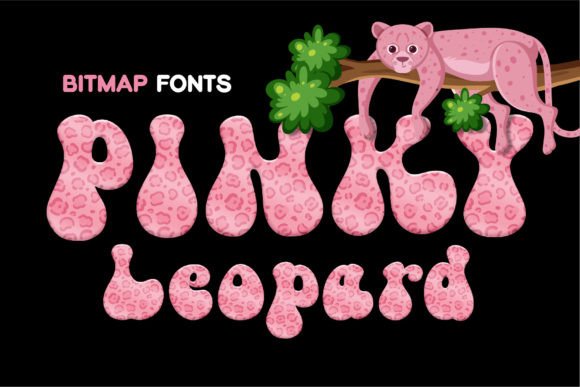
Every so often, a design asset crosses your path that doesn’t just sit in the background—it demands attention. That’s exactly what happens when you open up Pinky Leopard. It is a cool and fun decorative color font that moves away from the standard black-and-white text we are used to seeing. It isn’t a standard serif font or a simple sans serif font; it is a vibrant, pre-colored typeface that brings a specific, wild energy to your canvas.
Visually, this font captures the essence of the name perfectly. It features the distinct, organic shapes of leopard spots, but rendered with a playful, pink-toned color palette. Because it is an OpenType-SVG bitmap font, the texture and color are baked right into the letterforms. You aren't just typing a letter "A"; you are placing a graphic representation of that letter that includes shading, texture, and hue. This makes it a fantastic premium font for anyone looking to add a modern typography flair to their work without spending hours creating custom textures in Photoshop.
Where This Creative Font Shines
The versatility of a decorative font like this is surprisingly broad, provided you use it with the right intent. Because of its distinct personality, Pinky Leopard works best for projects that need to convey fun, energy, and a bit of edge. It is an excellent choice for t-shirt design, particularly for streetwear or novelty apparel where the text is the focal point. Tote bags, hats, and stickers also benefit from this typeface because the design is self-contained; you don’t need to add extra graphics to make the lettering pop.
Beyond physical merchandise, think about digital applications. It is a standout choice for social media graphics where you need to stop the scroll. Instagram stories, YouTube thumbnails, and Pinterest pins often rely on high-contrast visuals, and this font delivers that immediately. For entrepreneurs and small business owners, consider using it for specific elements of brand identity that target a younger, trendy demographic—perhaps a logo design for a boutique or a fun header for a website. Wedding designers might find it fits perfectly into bachelorette party invitations or "party bride" merchandise, rather than the formal ceremony stationery.
Pairing and Readability: Practical Design Strategy
When working with a bold display font like Pinky Leopard, the most important rule is restraint. Because the font carries so much visual weight and texture, using it for long paragraphs would be a mistake. It is not designed for body copy or editorial design where long-form reading is required. Instead, use it for headlines, subheadings, or single-word callouts.
To create visual hierarchy, pair it with something neutral. A clean sans serif font or a minimalist script font works well as a companion. For example, if you are designing a logo or a card, use Pinky Leopard for the main keyword—like "SALE" or "LOVE"—and use a simple, legible font for the smaller details. This contrast ensures that your design looks professional rather than chaotic. It allows the decorative elements to stand out without overwhelming the viewer's eye.
Technical Guide: Changing Colors and Compatibility
One of the most common questions regarding color fonts involves customization. While Pinky Leopard comes in a specific color scheme, you may want to alter it to match a specific client’s palette. The process differs slightly between software, but it is manageable once you know the steps.
For Adobe Photoshop users, the color is embedded in the glyph. To change it, you first need to convert the text layer into a graphic. Right-click on the text layer and select Rasterize Type. Once rasterized, the text is no longer editable as text, but you can manipulate the pixels. Press Ctrl+U (or Command+U on Mac) to bring up the Hue/Saturation dialog. Check the box for Colorize, and then adjust the sliders to shift the hue to whatever you desire.
In Adobe Illustrator, the workflow is similar but leverages vector capabilities before rasterizing. Select the text, go to Object, then Rasterize. It is crucial to set the Resolution to High (300 ppi) and the Background to Transparent to maintain quality. Once applied, go to Edit, then Edit Colors, and finally Adjust Colors. Here, you can preview changes and select different color bars to shift the look of the font.
Important Software Limitations
It is vital to understand the technology behind OpenType-SVG bitmap fonts to avoid frustration. This technology is relatively modern, and not all software supports it fully.
- Supported Apps: You will have full success using Pinky Leopard in Photoshop CC 2017 and newer, Illustrator CC 2018+, InDesign CC 2019+, and specific MacOS native apps like FontBook, Pages, and Keynote.
- Unsupported Apps: If you are using older versions, such as Photoshop CC 2015 or older, the font will likely appear as a black block or a generic fallback glyph. The color data will not be visible.
Furthermore, web-based tools have limitations. Canva does not support color fonts. If you try to upload this typeface to Canva, it will not render the pink leopard texture correctly. For web design or social media graphics created in Canva, it is better to create the text in Photoshop, save it as a transparent PNG, and upload that image to your Canva project.
Final Thoughts on Application
Choosing the right font is about matching the tool to the message. Pinky Leopard is a specialized design asset. It isn't meant to replace your go-to body text fonts; it is meant to elevate specific creative ideas. Whether you are crafting a logo for a trendy startup, designing stickers for an Etsy shop, or creating a bold header for a marketing campaign, this font ensures your work stands out. It brings a level of professionalism to "fun" designs that standard text tools often lack.
By understanding its technical requirements and pairing it effectively, you can leverage this typeface to create high-impact visuals that resonate with your audience. It is a creative font that proves typography doesn't have to be boring to be effective.