Wiggleluck: The Vibrant SVG Font for Modern Projects
A Fresh Take on Color Typography
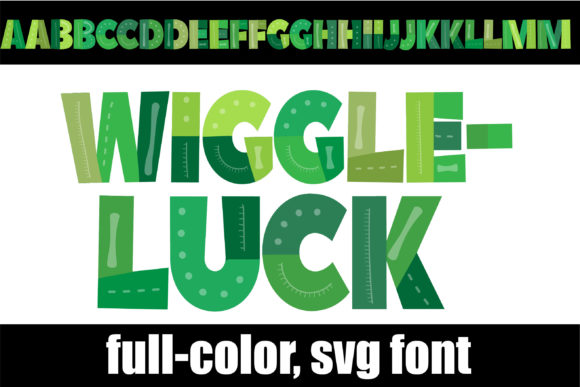
If you've spent any time looking for a creative font that breaks away from the monochrome standard, you've likely encountered the challenge. Most typefaces, even premium font options, exist in black or white. Wiggleluck changes the game. This full-color display font is built as an OpenType SVG, meaning it carries its own embedded color data. The result is a typeface drenched in lively green hues and intricate patterns. It’s not just a letter; it’s a miniature piece of digital art for every character you type.
The visual personality of Wiggleluck is unmistakable. It blends a playful, almost handcrafted aesthetic with the crispness of modern typography. The green color palette isn't a flat, single tone. You’ll see gradients, shading, and pattern details that give the letters depth and a tangible texture. This isn't a subtle serif font for body copy. Wiggleluck is a bold statement, designed to capture attention and inject energy. It feels organic yet polished, making it a versatile asset in your design toolkit.
Where Wiggleluck Shines: Practical Applications
Understanding where to use a specialty font like Wiggleluck is key to getting the most value from it. Its strength lies in applications where a single, impactful word or short phrase needs to stand out. Think of it as a design asset for moments of emphasis.
- Logo Design & Brand Identity: For a brand that wants to project friendliness, creativity, or a connection to nature (the green palette is perfect for eco-friendly brands, wellness coaches, or organic product lines), Wiggleluck can form the core of a memorable logo. It immediately sets a tone of approachability and fun.
- Marketing & Social Media Graphics: In the fast-scrolling world of social media, grabbing attention is everything. Use Wiggleluck for headline text on Instagram posts, Facebook ads, or Pinterest pins. A vibrant, colorful font can stop the scroll far more effectively than a standard sans serif font.
- Packaging Design: Imagine a product label for a snack brand, a children's toy, or a handmade soap. Wiggleluck on the packaging instantly communicates a sense of joy and craftsmanship. It helps a product pop on a crowded shelf.
- Digital & Editorial Design: For bloggers, magazine layouts, or website hero sections, using Wiggleluck for a pull quote or a section header can break up text and add visual interest. It guides the reader's eye and adds personality to an editorial design.
- Personal Projects & Crafting: For hobbyists and crafters using software like Silhouette Studio, Wiggleluck is a dream. Create unique party invitations, custom t-shirts, or vibrant scrapbook elements. Its compatibility with cutting machines and design software makes it incredibly practical for hands-on projects.
Integrating Wiggleluck: Font Pairing and Readability
Using a bold, colorful display font effectively is about balance. Wiggleluck is a star performer, but it needs a supporting cast. This is where font pairing becomes crucial. The goal is to let Wiggleluck handle the headlines and short bursts of personality, while a more neutral font takes care of the heavy lifting for body text.
A classic and reliable approach is to pair a vibrant font with a clean, simple sans serif font. Think of Wiggleluck for your "H1" or "H2" headings, followed by a readable typeface like Open Sans, Lato, or Montserrat for your paragraphs. This creates a clear visual hierarchy: the colorful font draws you in, and the clean font ensures the message is easily digestible. You could also pair it with a sturdy serif font for a more classic, editorial contrast, but always prioritize readability for longer text blocks.
It's vital to remember that Wiggleluck is a display font. Its intricate green patterns and colors are designed for impact at larger sizes. Using it for a 10-point paragraph would not only be illegible but would also overwhelm the viewer. Test your font pairings in context. Mock up a social media post or a draft of your packaging design to see how the elements interact. Check the spacing (kerning and leading) to ensure everything feels harmonious.
Technical Notes for Seamless Use
As an OpenType full-color (SVG) font, Wiggleluck installs like any standard .otf file. On a Mac, you can use FontBook. Windows users can install it via the Control Panel or their preferred font manager. There’s one critical caveat to be aware of: color fonts require software support. In programs that don’t support the SVG format, Wiggleluck will render as a solid black silhouette. This is normal.
You’ll know your program is compatible when you type and see the colors. Major players like Adobe Photoshop, Illustrator, InDesign, Silhouette Studio, QuarkXPress, and the free Inkscape all support this technology. When you first select the font in a menu, it might still preview in black—don't be alarmed. The moment you type into the document canvas, the full color should appear. Always check the font’s license for commercial use if you’re applying it to client work or products for sale. This ensures you’re using this powerful design asset legally and professionally.
Wiggleluck is more than just a typeface; it’s a creative tool for adding instant vibrancy. By understanding its personality, pairing it wisely, and respecting its technical nature, you can leverage this green, patterned font to make your projects stand out with confidence and style.